
Get maintenance out of Excel and paper.
Log work orders, times and spare parts without losing half a morning writing things down. And finally get the data to know what's happening in your plant and decide with it, not by gut feeling.
No sign-up. It's test data: click anything you like. It can take up to ~1 min to start the first time. Give it a moment, it hasn't crashed. The demo interface is in Spanish.
What happens without a CMMS
It's not theory. It's how most companies work the day something breaks.
Time goes on writing things down
Paper work orders, a spreadsheet that grows out of control, loose notes on the workshop manager's desk. Recording what you do eats hours that should go to the machine.
And worst of all: you can't decide
When you want to know which breakdown keeps recurring, which machine stops you most or which spare part eats your budget, the data isn't there. You decide from memory and by eye.
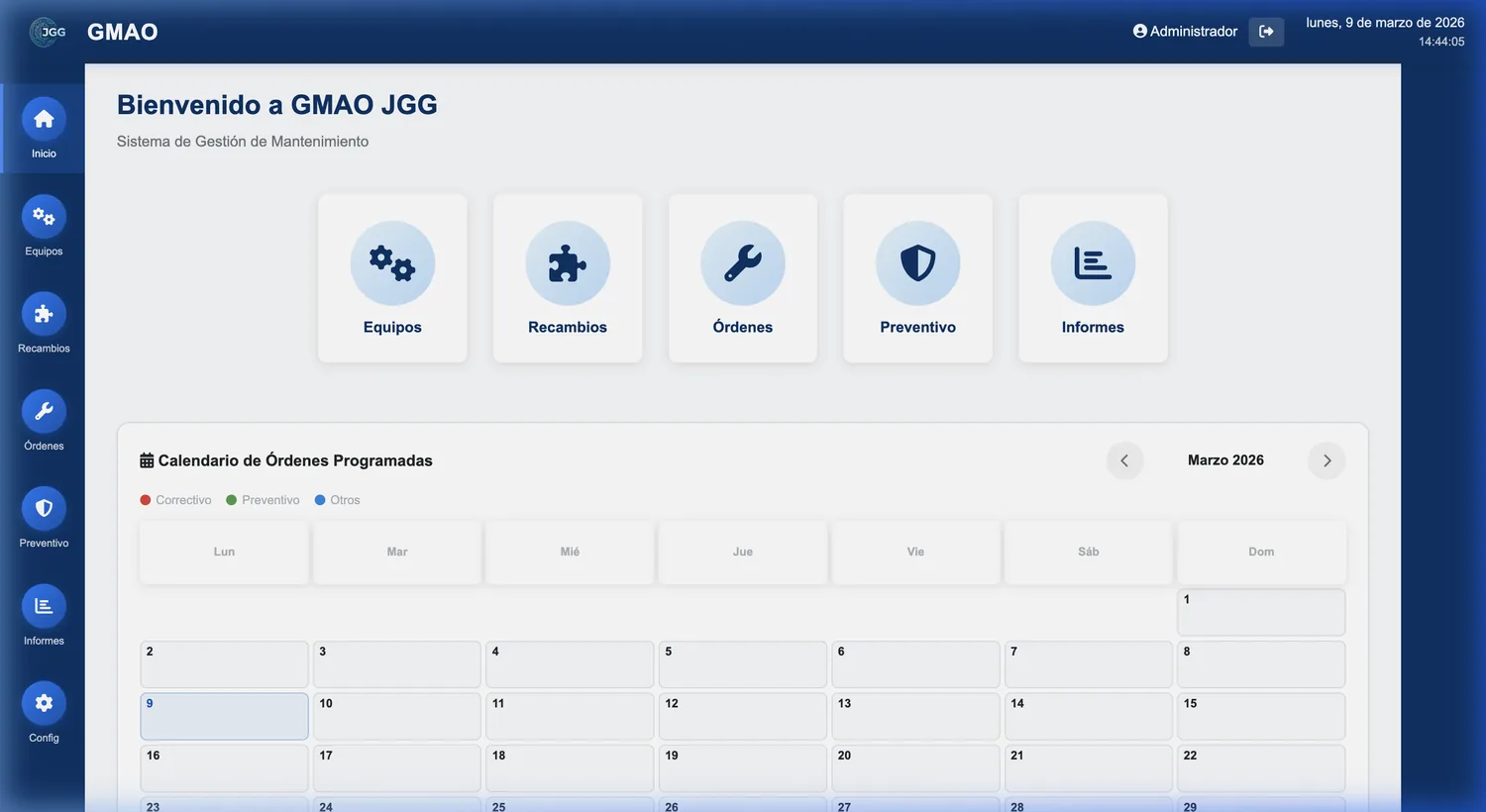
What GMAO JGG does
What you really need to manage maintenance. Without the excess, and without an IT department behind it.
| WORK ORDERS | Real times and costsOpen, assign and close. Time tracking and cost per order: labour, spare parts and external workshops. |
|---|---|
| SPARE PARTS | Real-time stockLow-stock alerts, inventory value and traceability of every entry, exit and consumption in the warehouse. |
| PREVENTIVE | Never miss a thingReusable routines with tasks and checklists. When you close a preventive job, the system schedules the next one on its own. |
| ASSETS | Your whole plant, organisedAsset tree by plant, line, machine and component, with history, criticality and cost per asset. |
| MOBILE | The technician, on the shop floorEach technician sees "My orders" on their phone, right next to the machine. No paperwork to lose. |
| NOTHING TO INSTALL | Web-based, with traceabilityOpens in the browser, no installation. And an audit log records who did what and when. |
Logging work is this simple
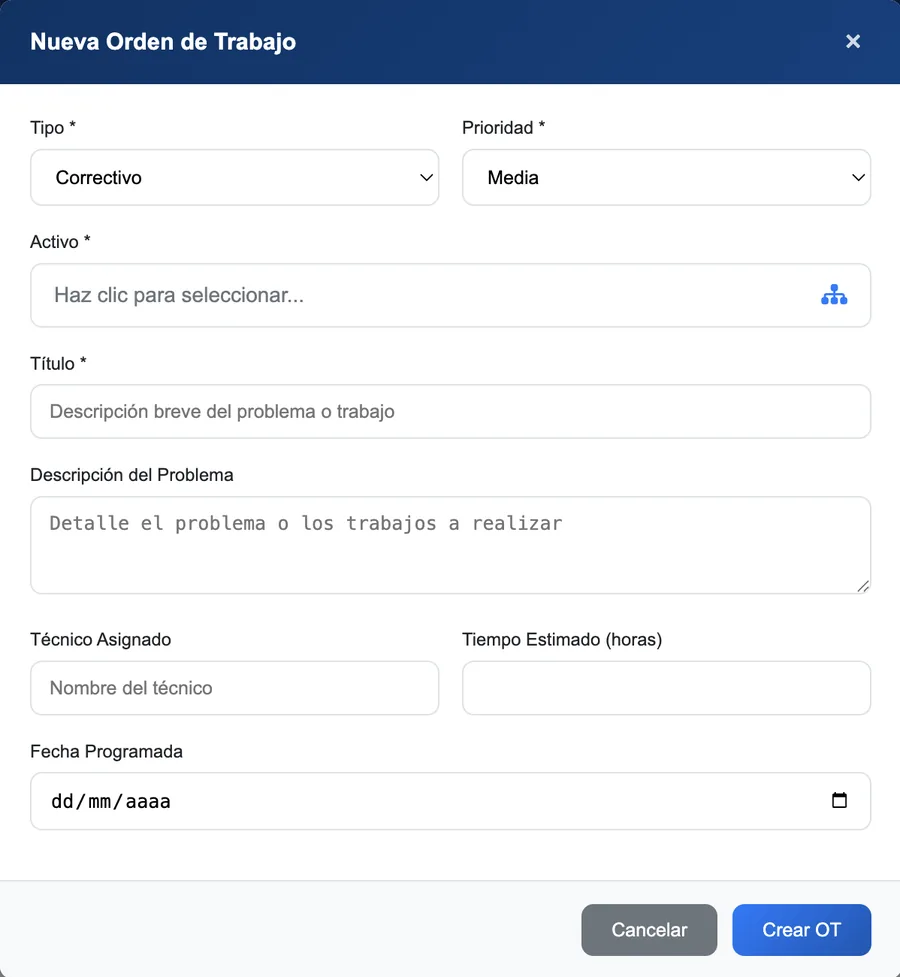
Creating an order takes four fields. The technician hits start, the timer runs, and when finished everything is recorded: time, spare parts and solution. No endless forms.
- Type and priority in one click: corrective, preventive, statutory inspection, calibration…
- Time tracking with start and pause. Real time, not one estimated from memory.
- One order, several assets when the same intervention repeats on identical machines.
Data to decide with, not to bury in Excel
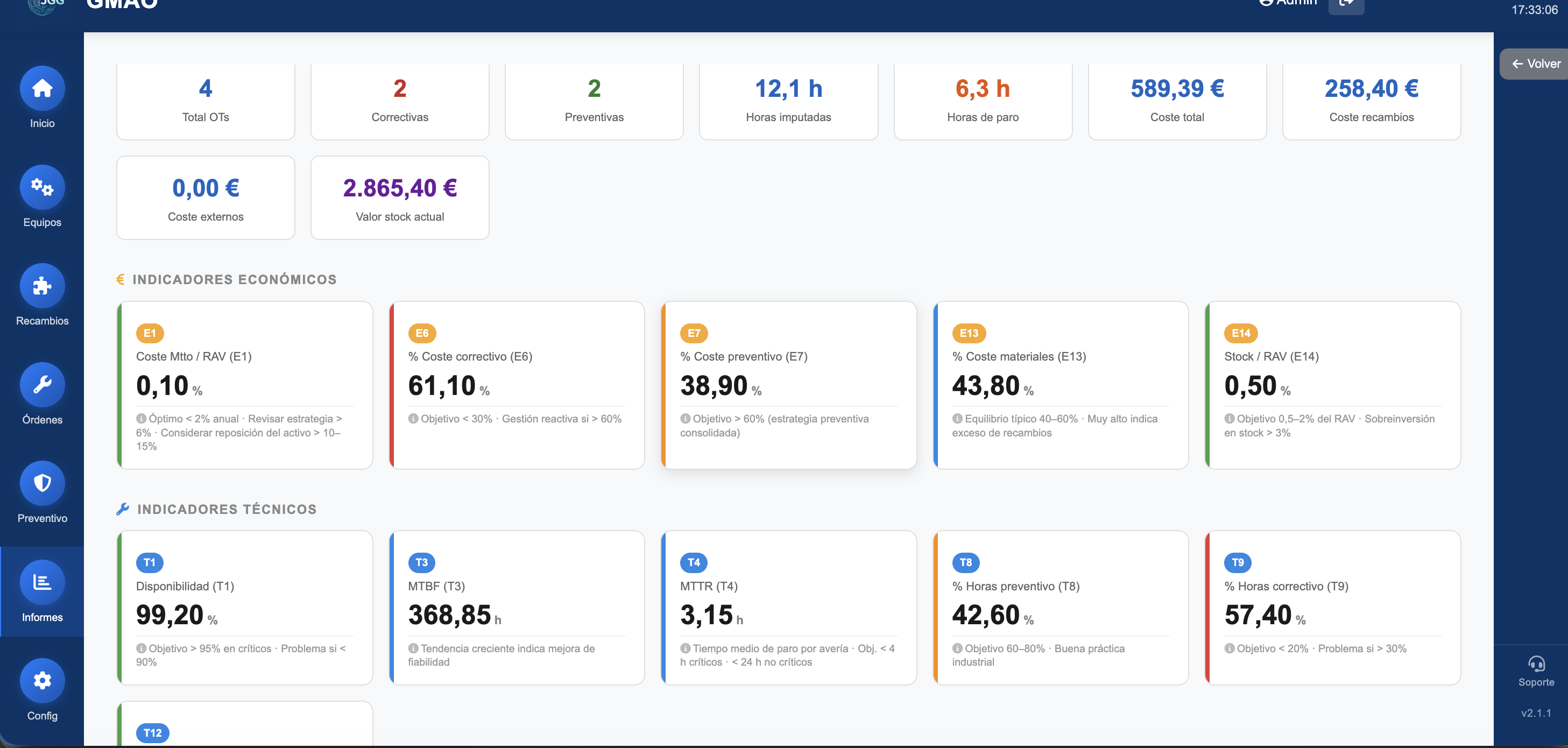
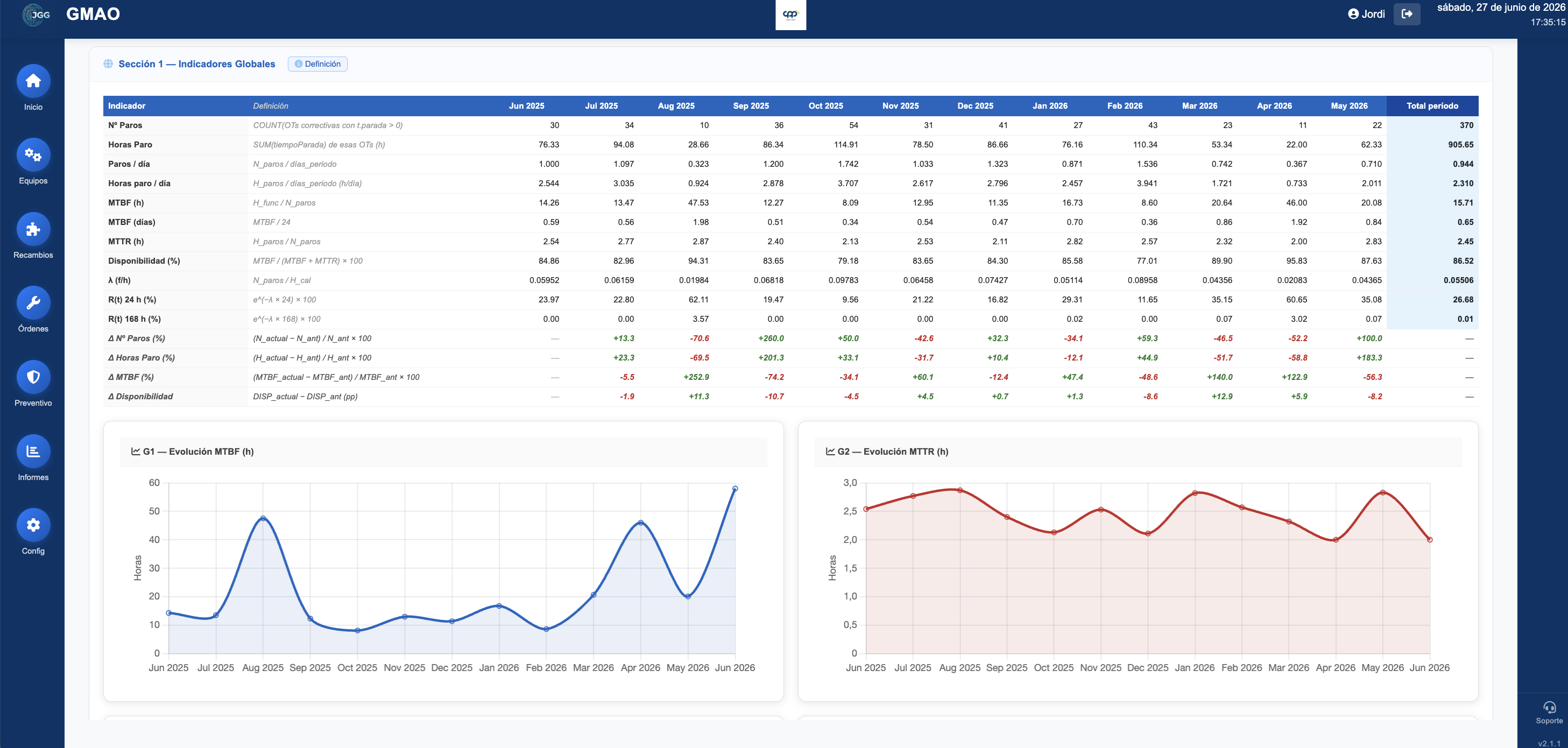
This is the difference between recording and managing. Seven reports and dashboards that tell you what is really happening in your plant, with the indicators used in industrial maintenance.
- Recurring breakdowns and the machines that stop most (Pareto, heat map, top assets).
- MTBF, MTTR, availability and reliability per asset and per line.
- 14 indicators from the EN 15341 standard, the European standard for maintenance KPIs.
Made from inside the plant

It's not the invention of a programmer with no context. I ran maintenance inside a plant for years, with Excel and paper on my back. I built this to solve the problem I lived. That's why it's serious where it has to be and simple everywhere else.
Also need batch traceability? Gestión Almacén covers warehouse and GMP compliance, designed to live alongside the GMAO in the same operations suite.
Flat rate per site. No per-user fees.
Technicians and operators log in without the invoice growing. Set-up is done by an operations and Industry 4.0 consultant, not by tech support: you do not get an empty tool, you get maintenance already organised, in weeks, not months.
Implementation, one-off
| Kick-off | Full set-up | |
|---|---|---|
| Price | €1,900 | €4,500 |
| Account and configuration | Included, with users and shifts. | Included, with users and shifts. |
| Excel import | Up to 300 assets, plus the spare parts and task lists the client provides. | Up to 300 assets, plus the spare parts and task lists the client provides. |
| On-site inventory | Not included. | Included. |
| Preventive plan built from manuals and history | Not included. | Included. |
| EN 15341 KPIs configured | Not included. | Included. |
| Training | 2 sessions of 2 h. | 8 h. |
| Follow-up | 30 days. | 30 days and a review at 60 days. |
Request an implementation proposal →
Monthly fee per site
| Essential | ProfessionalRecommended | Site+ | |
|---|---|---|---|
| Monthly fee | €149/monthor €1,490/year: 2 months free | €249/monthor €2,490/year: 2 months free | €399/monthor €3,990/year: 2 months free |
| Users | Up to 5. | Up to 15. | Unlimited. |
| Support | Email, reply within 48 working hours. | Email and phone, reply within 24 working hours. | Priority, reply within 8 working hours. |
| Review with the consultant | Not included. | 1 h per quarter. | 1 h per month. |
| Consulting hours | Not included. | Not included. | 4 h per quarter. |
| Request a demo → | Request a demo → | Let's talk → |
Mail client not opening? jordi@jggsolutions.com · 676 460 703
Same features in all three plans: users, support and consulting hours are what change. No client is ever missing a module.
Every plan includes EU hosting with a database dedicated to your company, backups, all updates and a full export of your data to Excel at any time, including if you leave.
Prices excl. VAT. 12-month minimum term; after that, renewal is for periods equal to the billing period. Annual CPI review. Multiple sites are quoted separately. New imports, extra training and custom development are quoted on request; additional consulting hour, €65/h.
First clients: price guaranteed for 24 months in exchange for acting as a reference case.
Frequently asked questions about the GMAO
What is a CMMS?
CMMS stands for Computerised Maintenance Management System. It is software that centralises a plant's work orders, assets, spare parts and preventive maintenance, and gathers the data to make decisions. GMAO JGG does this designed for industry, without the complexity of the big solutions.
Do I need to install anything?
No. It is a web application: it opens in the browser, on a computer, tablet or phone, with nothing to install. The technician checks their orders from their phone on the shop floor.
What kind of company is it for?
Single-site industrial SMEs with 20 to 250 employees and 1 to 5 maintenance technicians, who currently run maintenance on Excel or paper. It is not aimed at groups with many sites.
What maintenance indicators does it offer?
Times and costs per asset, MTBF, MTTR, availability and reliability, and the 14 indicators of the European standard EN 15341. All reports export to Excel.
Can I try it first?
Yes. There is a live demo, no sign-up: you go in and try it with sample data. And if you like, I'll show it to you in 15 minutes on your own case.
Why do I have to pay for implementation?
Because we do not hand you an empty tool. JGG sets the GMAO up with you: configuration, import of your assets and training, carried out by an operations and Industry 4.0 consultant. That is the difference from a self-service product: you start with maintenance already organised, not with a blank screen.
What happens to my data if I leave?
It is yours. It is hosted in the EU (Frankfurt region), in a database dedicated to your company, and you can export all of it to Excel at any time, including if you leave. No lock-in.
How long does set-up take?
Weeks, not months. The Kick-off implementation includes 30 days of follow-up, and the full set-up adds a review at 60 days.
Does it work on the technician's phone?
Yes. It is a web application that opens on the phone on the shop floor, and equipment can carry QR codes.
What if I need more than 15 users?
The Site+ plan has unlimited users. If you have more than one site, they are quoted separately: write to me and we will talk it through.
Can I change plan?
Yes. The fee is adjusted to the plan you need, and that is all.
Come in and play with it. Or I'll show you in 15 minutes.
See the demo yourself, no strings attached. And if you like, I'll show you on your own case: write to me and I'll propose a couple of slots this week.